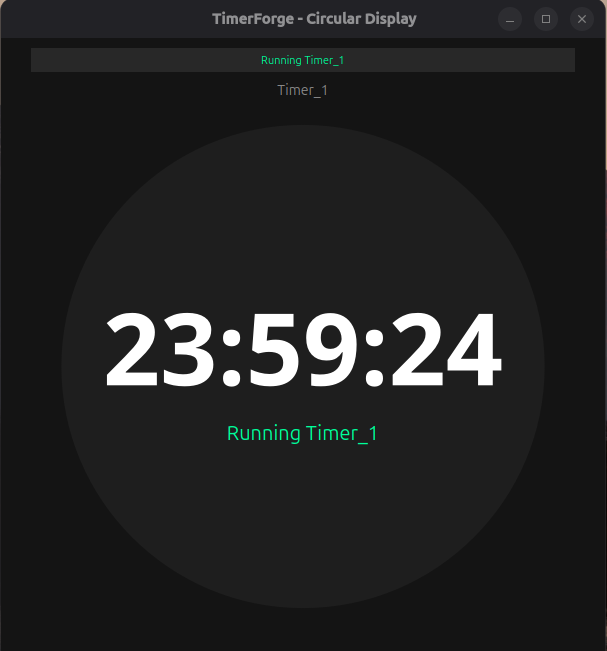
Professional Timer App
Built for Productivity

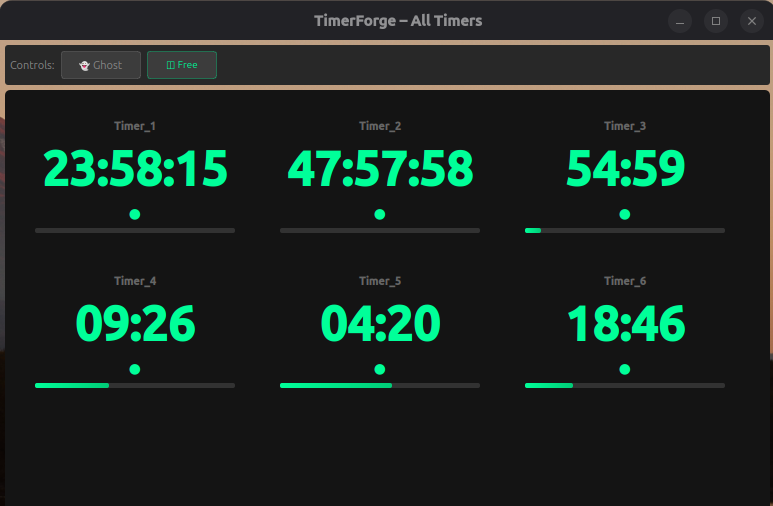
Run multiple timers simultaneously. Custom sounds. Beautiful themes. Perfect for cooking, workouts, work sessions, and more.

✓ Windows ✓ macOS ✓ Linux
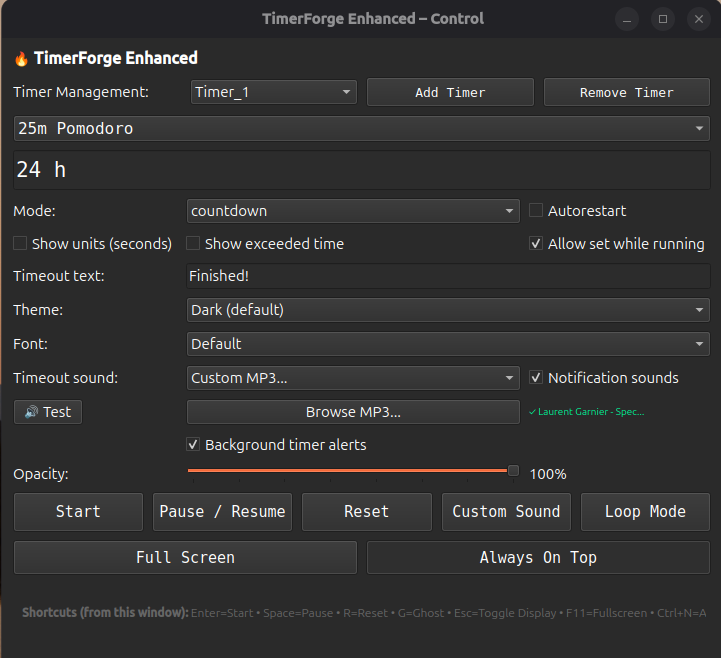
Powerful Features

Everything you need in a timer application

🎯

Multiple Timers

Run unlimited timers simultaneously. Each with its own settings and sounds.

🎵

Custom Sounds

Use your own MP3 files or choose from 5 built-in sounds. Different sound for each timer.

🎨

Beautiful Themes

7 stunning themes including Dark, Light, Ocean, Sunset, and more.

Keyboard Shortcuts

Control timers with keyboard shortcuts. Space to pause, R to reset, and more.

👻

Ghost Mode

Make timer windows click-through so they don't interfere with your work.

🔔

Smart Notifications

Get notified at intervals (10s, 30s, 1m, 5m) and when timers finish.

💫

Opacity Control

Adjust window transparency from 30% to 100% for perfect visibility.

Countdown & Count-Up

Track time forward or backward. Perfect for any timing need.

Perfect For

🍳

Cooking

Time multiple dishes simultaneously with different alarms for each.

💪

Workouts

Track exercises, rest periods, and circuit training intervals.

📚

Study Sessions

Pomodoro technique with customizable work and break intervals.

💼

Meetings

Keep track of presentation time, Q&A, and total meeting duration.

What Our Users Say

Join thousands of satisfied users

⭐⭐⭐⭐⭐

"TimerForge is a game-changer for cooking! I can time multiple dishes simultaneously, each with its own alarm. No more burnt food or overcooked pasta!"

👨‍🍳
Marcus Chen
Home Chef
⭐⭐⭐⭐⭐

"Perfect for HIIT workouts! The ghost mode lets me keep timers visible without them interfering with my workout videos. Absolutely essential for my training sessions."

💪
Sarah Mitchell
Fitness Instructor
⭐⭐⭐⭐⭐

"As a developer, I run 10+ Pomodoro timers simultaneously for different projects. TimerForge handles it flawlessly. The keyboard shortcuts save me so much time!"

👨‍💻
David Park
Software Developer
⭐⭐⭐⭐⭐

"I manage multiple client meetings daily. TimerForge helps me track presentation time, Q&A, and total meeting duration. Professional and reliable!"

💼
Jennifer Lopez
Project Manager
⭐⭐⭐⭐⭐

"The light theme is perfect for long study sessions. I use the Pomodoro technique religiously, and TimerForge makes it effortless to stay focused and productive."

📚
Emily Zhang
Medical Student
⭐⭐⭐⭐⭐

"Love that one license works on Windows, macOS, and Linux! I switch between devices constantly for design work. TimerForge keeps me on track everywhere."

🎨
Alex Rivera
Graphic Designer
10,000+
Active Users
4.9/5
Average Rating
98%
Satisfaction Rate

Simple Pricing

One-time purchase. All platforms. Free updates.

TimerForge

$ 17 .95

One-time payment

  • ✓ Windows, macOS, and Linux
  • ✓ Unlimited timers per installation
  • ✓ All themes and fonts
  • ✓ Custom MP3 sounds
  • ✓ Free lifetime updates
  • ✓ Email support
  • ✓ 30-day money-back guarantee

Secure payment via Stripe • Instant download

Download

Choose your platform

🪟

Windows

Windows 10 or later

75 MB

Purchase to Download
🍎

macOS

macOS 10.15 or later

95 MB

Purchase to Download
🐧

Linux

Ubuntu 20.04+ or equivalent

80 MB

Purchase to Download

Frequently Asked Questions

Can I use TimerForge on multiple computers?

Yes! Your purchase includes licenses for all your personal computers across all platforms.

Do I need to install anything?

No! TimerForge is a standalone application. Just download, extract, and run. No Python or other dependencies required.

What's your refund policy?

We offer a 30-day money-back guarantee. If you're not satisfied, email us for a full refund.

Will I get future updates?

Yes! All future updates are free for life. We regularly add new features and improvements.

Can I use my own sounds?

Absolutely! TimerForge supports custom MP3, WAV, and OGG files. Use any sound you like.

Is there a trial version?

Due to the low price and money-back guarantee, we don't offer a trial. But you can request a refund within 30 days if not satisfied.